
Acting on her own
Let your character speak and act on her own when the conversation goes quiet.
A character who only ever answers can feel like she's waiting for her cue. When she acts on her own, she doesn't. When you go quiet, she can pick the conversation back up, tease you about the silence, or do something in the scene, all on her own. It's what makes her feel present between your words.
It's on by default, and it works during Interactive Mode sessions.
Acting on her own is in both memberships, Pro and Max, and in the 7-day free trial. In Pro she speaks up on her own; what she does in your VaM scene by herself (scene actions, her clothes) is in Max. Settings → Account shows what yours includes. See Your membership.
Where to find it
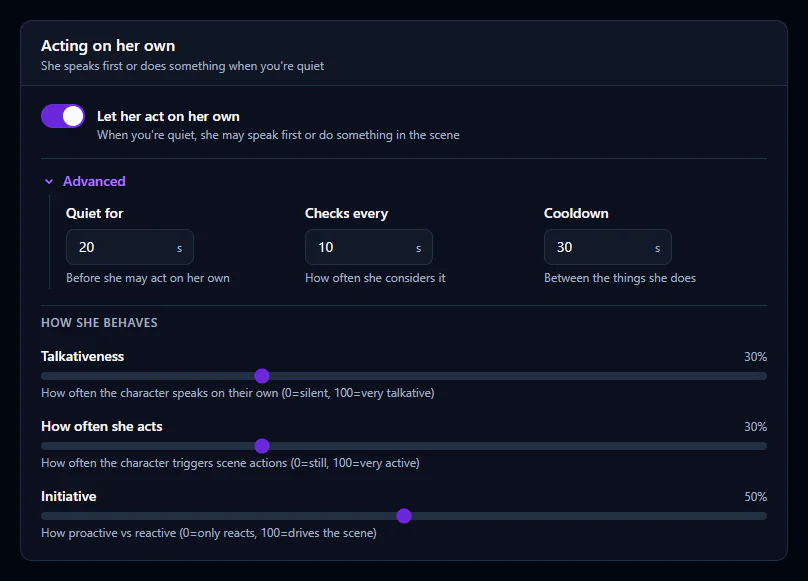
Open Advanced → Settings → Conversation and scroll to the Acting on her own card. Everything on this page lives there.
Turning it on or off
Let her act on her own is the main switch. With it off, she only ever answers you. With it on, the timing fields (under Advanced) and the sliders appear.
When she may act: the timing fields
| Field | What it controls | Default |
|---|---|---|
| Quiet for (seconds) | How long things must be quiet before she considers acting. 5 to 120 seconds. | 10 |
| Checks every (seconds) | How often she asks herself whether now is a good moment. 5 to 60 seconds. | 10 |
| Cooldown (seconds) | The shortest gap between two things she does on her own. 5 to 120 seconds. | 10 |
The quiet is counted from whichever came last: you talking, or her finishing a line. A long reply doesn't eat into the pause.
If she jumps in too eagerly, lengthen Quiet for first. It's the single best way to make her feel calmer.
How she acts: the sliders
The sliders sit under How she behaves. Each runs from 0 to 100. They're about feel, not numbers, so nudge one and listen.
| Slider | Higher | Lower |
|---|---|---|
| Talkativeness | She speaks up often and keeps things going. | She mostly waits for you. |
| How often she acts | She does more in the scene. | She stays still and lets her words do the work. |
| Initiative | She drives the scene and brings up new things. | She reacts to what you do rather than leading. |
How much she says when she does speak comes from the How much she says card in the same section: Sounds only, Brief, Moderate or Talkative. It applies to her replies and to what she says on her own.
Starting points
There's no single right setting. Change one thing at a time, then talk for a minute before you change the next.
Shy and reactive. She mostly waits, and rarely takes over.
- Quiet for and Cooldown: long
- Talkativeness, How often she acts, Initiative: low
- How much she says: Brief
Bold and chatty. She fills the quiet and leads.
- Quiet for and Cooldown: short
- Talkativeness, How often she acts, Initiative: high
- How much she says: Moderate or Talkative
When she holds back
She won't talk over you, and she won't start something while she's still speaking. You're always in charge: start talking and she stops to listen, just like in any conversation.
Each check is a request to your AI service, which bills your account. So she's thoughtful about it:
- When she decides there's nothing worth doing, she waits longer before the next check, up to five minutes.
- After about 15 minutes with no talking and nothing changing in the scene, she stops checking altogether.
- If your AI service refuses a request, for example because a key was rejected, she stops and shows you why.
Talking, typing or anything changing in the scene brings her back.
Acting on her own belongs to Interactive Mode. Director Mode plays out a planned scene instead and doesn't use these settings.
Next steps
- The full guide to live conversations: Interactive Mode
- Fine-tune how vamAI hears you: Microphone & speech