
Character memory
How your character remembers you, and how to see, shape and manage what she has learned.
Memory is what makes a vamAI character feel like she actually knows you. As you talk, she remembers things: what you like, what happened last time, how a conversation felt. Later she brings them up on her own. This guide covers what memory is made of, where to see it, and how to add to it or clean it up.
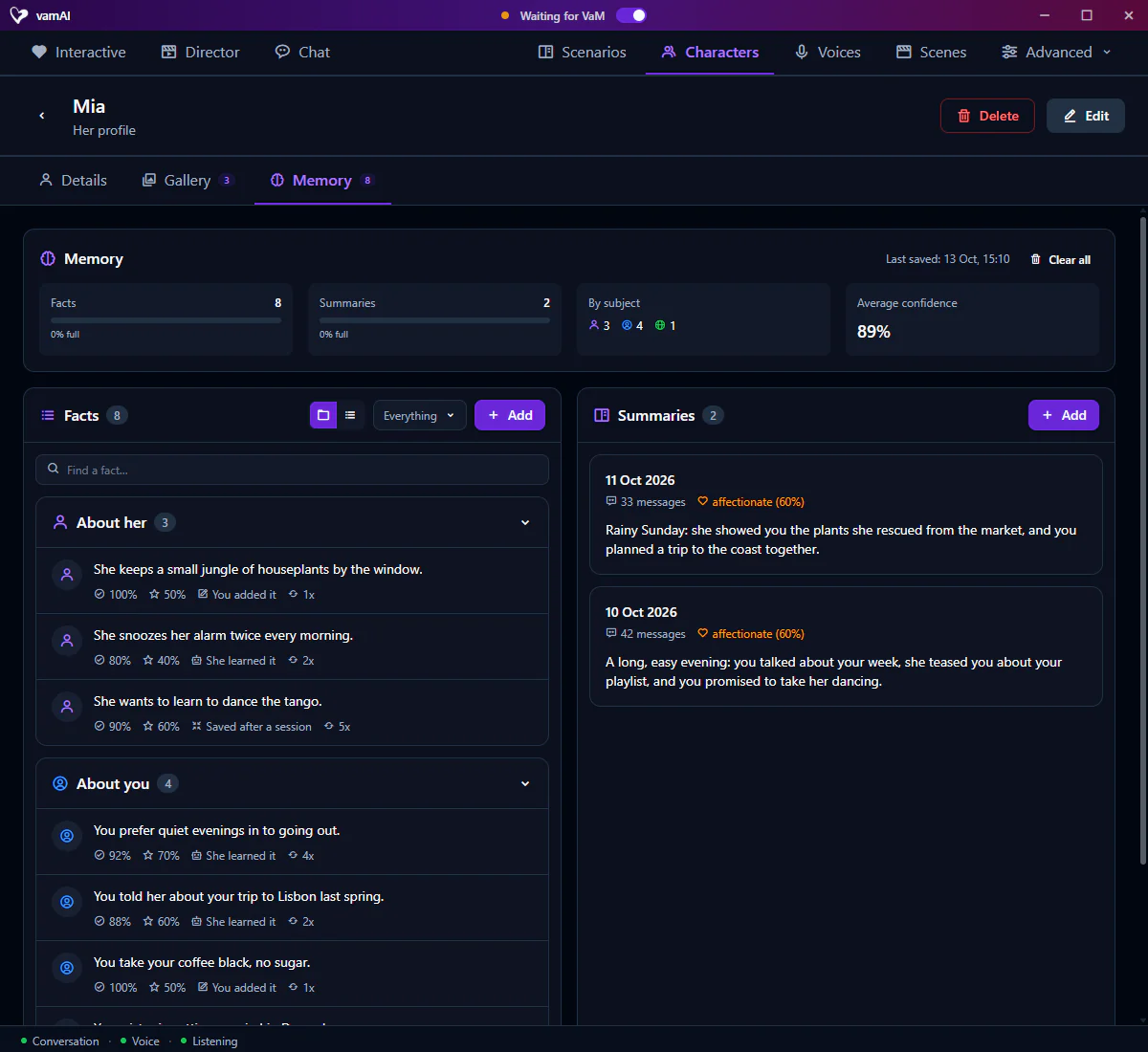
Everything here lives on the Memory tab of a character's profile. Open the Characters tab and click a character to get there.
Character memory is in both memberships, Pro and Max, and in the 7-day free trial. Settings → Account shows what yours includes. See Your membership.
What memory is made of
| Type | What it is |
|---|---|
| Facts | Single things she knows: "the Player loves rainy nights," "my favourite colour is deep red." |
| Summaries | A short account of each past conversation, including how it felt. |
Facts give her knowledge. Summaries give her a sense of your history together.
The Memory card
The Memory card at the top of the tab gives you the big picture:
| Stat | What it tells you |
|---|---|
| Facts | How many facts she holds, and how full her room for facts is. |
| Summaries | How many conversation summaries she has, and how full her room for summaries is. |
| By subject | How many facts are About her, About you and about The world (everything else). |
| Average confidence | How sure she is, on average, about what she knows. |
| Last saved | When vamAI last saved and tidied her memory after a conversation. |
Clear all deletes every fact and summary she remembers. vamAI asks before it does.
Facts
The Facts panel lists everything she has learned. Show it grouped by subject or as one list (the folder and list buttons beside the subject menu), and use the subject menu to show only About her, About you or The world facts (Everything shows them all). Once she knows more than a handful, Find a fact… searches them. Each fact shows a few details:

| Detail | What it tells you |
|---|---|
| Confidence | How sure she is that it's true, as a percentage. |
| Importance | How much it matters to her. |
| Source | Where it came from: She learned it (in a conversation), You added it or Saved after a session (merged from older memories). |
| Reinforced | How many times it has come up again. Each time makes it stronger. |
Memories fade, but aren't lost
A fact she never hears about again slowly loses confidence, the way real memories fade. Faded facts drop down her list of what comes to mind, but she doesn't forget them completely. When a later conversation confirms a fact, its confidence goes back up.
Adding, editing and deleting facts
You can shape her memory yourself:
- Click Add on the Facts panel (or Add her first fact if it's empty). Write the fact, choose its subject, and set its confidence and importance.
- Hover over a fact and click the pencil to edit it. Handy when she misheard a detail.
- Hover over a fact and click the bin to delete it.
Facts you add yourself are marked You added it, so you can always tell them apart from what she picked up herself.
A few facts of your own are a lovely way to give a brand-new character some shared history before your first real conversation.
Summaries
The Summaries panel holds a short account of each past conversation: not a transcript, but what happened and how it felt. Each one shows:
- When the conversation took place, and how many messages it had.
- The primary emotion and how strong it was.
- Any emotional shifts along the way.
- Intimate moments worth remembering.
Each conversation gets one summary. During a long session vamAI keeps that summary up to date rather than adding new ones. You can add, edit or delete summaries yourself too.
How memory fills itself
Most of the time you don't touch any of this. vamAI does it for you, in the background:
- During a session, every few messages, vamAI reads what was said since last time and saves new facts and updates old ones.
- When a session ends, it saves whatever hasn't been processed yet and updates the conversation's summary. Very short sessions are skipped.
This works in Interactive Mode and in text chat on the Chat tab. In Director Mode, a character remembers her own lines when a saved character has the same name as the scenario's actor.
You can change how often this happens, or turn either part off, under Settings → Memory. See Memory & conversations.
This work uses your conversation service, so it counts towards what that service bills you. It runs only when there's something new to read.
When memory gets full
Each character has a set amount of room for facts and for summaries; the bars on the Memory card show how full it is. When it runs out, vamAI first merges and shortens facts. If that's not enough, it lets go of the least useful facts (low confidence and low importance) and the oldest summaries. Facts you added yourself are never removed this way.
Deleting a character
Deleting a character is permanent and takes her whole memory with it: every fact and every summary, along with her gallery pictures. There is no undo. See Creating characters.
Next steps
- Back to building a character: Creating characters
- Change when memories are saved: Memory & conversations