
Memory & conversations
Choose when vamAI saves what your characters remember.
Your characters remember things across conversations: your name, what you've told them, how past sessions went. The Memory section of Settings decides when vamAI saves those memories. You don't have to do anything for it to work; the defaults save as you go.
This page covers the settings. To see, edit or delete what a character remembers, open that character's Memory tab. The full tour is in Character memory.
Open the Advanced menu → Settings → Memory.
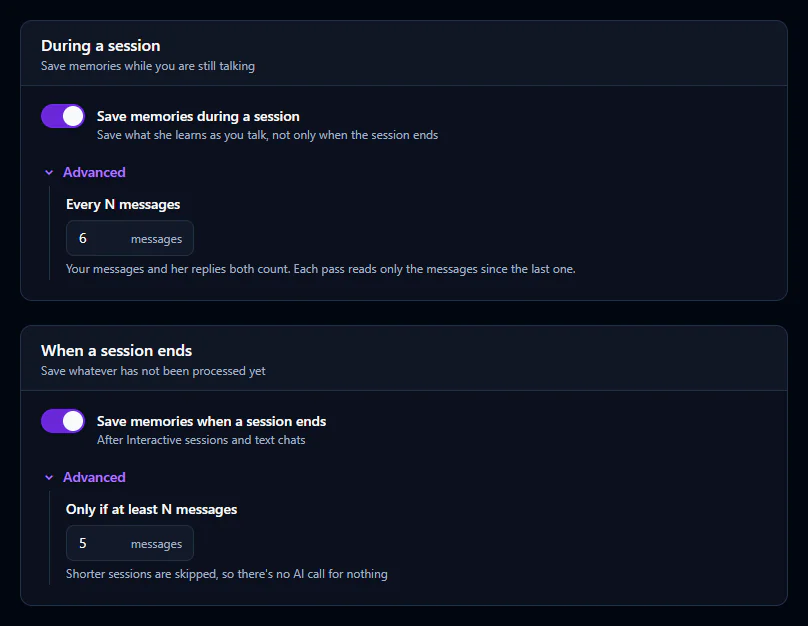
How memories are made
Every so often, vamAI reads the newest part of your conversation and picks out what's worth keeping: facts about you, about her, and about your world. It also keeps one summary of each session, which it updates as the session goes on.
Each of these passes is one small request to your conversation AI service, so it's billed by that service like any other message. Finding the right memories at the start of each reply happens on your PC.
During a session
Save memories during a session (on by default) saves memories while you're still talking, instead of only at the end. That way nothing is lost if a session ends unexpectedly.
Every N messages, under Advanced in the same card, sets how often that happens. Your messages and her replies both count. Each pass only reads what's new since the last one.
- A smaller number saves more often, with more requests to your AI service.
- A larger number saves less often, in bigger batches.
When a session ends
Save memories when a session ends (on by default) processes whatever hasn't been saved yet when you stop. It applies to Interactive sessions and to text chats in the Chat tab.
Only if at least N messages, under Advanced, skips very short sessions, so a quick hello doesn't cost an AI request for nothing.
If you close vamAI in the middle of a conversation, a Saving memories window appears while it finishes up. Let it complete, and nothing from that conversation is lost.
Tips
- Leave both switches on for the most natural experience. She learns as you go, without any effort from you.
- Prefer to manage memory yourself? Turn both off, then add or edit facts on the character's Memory tab.
- Memories she hasn't brought up in a while slowly lose weight, so the things you talk about often stay strongest.
Character memory is in both memberships, Pro and Max, and in the 7-day free trial. Settings → Account shows what yours includes. See Your membership.
Next steps
Read Character memory for the Memory tab, facts and summaries. Or set up the characters themselves in Creating characters.