
Idle motion
She breathes, shifts her weight and looks at you, so she's never frozen while nothing else is moving her.
A character who stands perfectly still between lines looks like a mannequin. With idle motion, the vamAI plugin keeps her gently alive in your VaM scene: her chest rises with each breath, she shifts her weight, her hands settle, and her eyes find you, glance away and come back. It's on by default.
Idle motion works in every membership, Pro and Max, and in the 7-day free trial.
What you'll see
- She breathes, and her breathing quickens and deepens as she gets more excited. She lets out an occasional sigh.
- She moves a little: her head tilts, her body sways and shifts its weight, her arms and legs make small movements and settle again.
- She looks at you, holds your eyes for a moment, glances away and comes back. A dominant character holds your gaze longer; a submissive one looks down more often (her Dynamic, on her profile).
- She listens. While you talk, her eyes stay on you and her head tilts towards you; she gives a small nod when you finish. Just before she speaks, she takes a breath.
Her face isn't part of it: that stays with her look, lip-sync and facial expressions.
It never fights you
Idle motion only moves a part of her while that part is still and nothing else is moving it. The moment something else does, it lets go of that part at once:
- you grab or move her, or another plugin or animation (a Timeline, a pose change) moves her;
- someone touches her, or she's being kissed;
- her mouth or her hands are busy, or there's contact between your bodies.
When the part has been still again for a moment, the movement starts again from wherever she now is. Every part is judged on its own, so a grabbed hand doesn't stop her breathing.
When it runs
During every session, in Interactive Mode and Director Mode. With Also outside sessions on, it also runs whenever VaM is open and connected to vamAI with no session running. It moves only the character you're talking to: Her (atom) under Scene setup.
When a session ends she fades back to exactly the pose she was in.
Settings
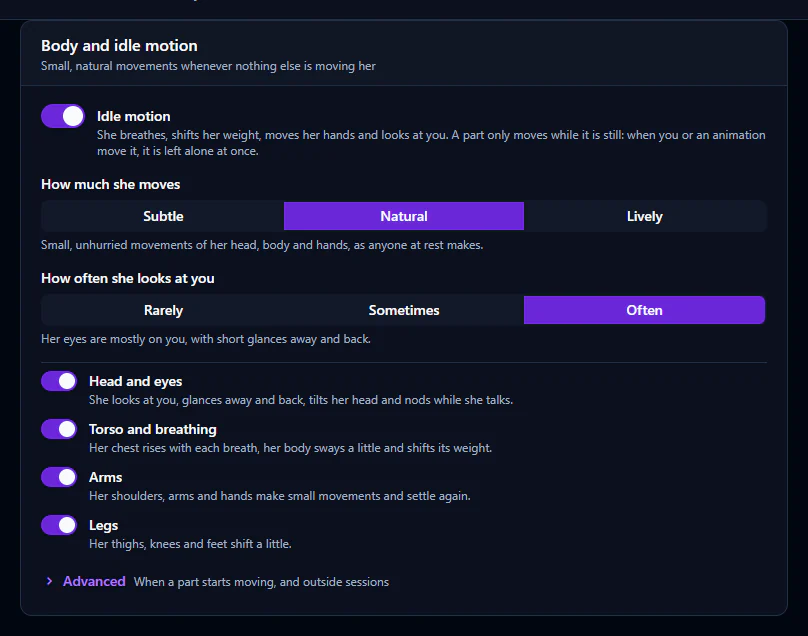
Open Advanced → Settings → Body and scene and find the Body and idle motion card.
| Setting | What it does |
|---|---|
| Idle motion | The main switch. |
| How much she moves | Subtle (breathing and the smallest shifts), Natural (the default) or Lively (bigger, more frequent, a restless mood). |
| How often she looks at you | Rarely, Sometimes or Often (the default). |
| Head and eyes, Torso and breathing, Arms, Legs | Switch off any part you'd rather keep still. |
| Wait before moving a still part (under Advanced) | Short (about a second), Normal (about two) or Long (about four, for scenes where you pose her often). |
| Also outside sessions (under Advanced) | Keeps her moving with no session running. Off by default. |
Posing her and saving
Saving the scene is safe: idle motion puts her back exactly before VaM saves, then carries on.
Saving a pose preset is different, because VaM gives plugins no warning. Pause idle motion first, save the pose, then resume. The vamAI plugin has three actions for this, Pause Idle Motion, Resume Idle Motion and Toggle Idle Motion, which you can call from a VaM trigger, a UI button in your scene, or a keybinding plugin. Pausing puts every part back to its rest at once and moves nothing until you resume.
If something looks wrong
- She doesn't move at all: check Idle motion is on, a session is running (or Also outside sessions is on), and Her (atom) is the character you expect. A part you're touching, or one an animation is moving, is left alone on purpose.
- She moves too much, or too little: change How much she moves, or switch off the parts you want still.
- She fidgets while you pose her: set Wait before moving a still part to Long, or pause it with the actions above.
Next steps
- Her face as she talks: Facial expressions
- Everything else she does in the scene: Live conversations