
Facial expressions
Her face takes on the mood of what she says, kept subtle, using AshAuryn's free expression morphs from the VaM Hub.
With Subtle expressions on, her face carries the feeling of what she's saying: a little smile when she's playful, a shy look away, a pout when you tease her, flushed and heated when things turn intimate. It comes in gently, holds for a moment and settles back after about 25 seconds, so she never freezes into a pose. It works in Interactive Mode and in Director Mode.
The expressions are morphs by the VaM creator AshAuryn, which you install in VaM yourself (they're free on the VaM Hub). vamAI doesn't include them; it only sets them, faintly, on her face.
Facial expressions work in every membership, Pro and Max, and in the 7-day free trial.
What you need
- Six of AshAuryn's packages in your VaM folder (below). Until they're all there, her face shows no expressions, and the settings card names the ones that are missing.
- Your VaM folder, chosen under Advanced → Settings → Look library, so vamAI can check the packages are installed.
- An up-to-date vamAI plugin in your scene. An older one can't show expressions, and the card says so.
The packages to install
Get them from the VaM Hub: open the Hub in VaM (or on the Hub website), search for AshAuryn, and download each of these. VaM puts them in your AddonPackages folder.
| Package | Version needed |
|---|---|
| AshAuryn's Assorted Expressions Pack 2 | 3 or newer |
| AshAuryn's Assorted Expression Pack with 75 Morphs | 7 or newer |
| AshAuryn 2022 Expressions Pack 2: Big Smiles | 3 or newer |
| AshAuryn's 2022 Expression Pack 3: Nauseous | 2 or newer |
| AshAuryn 2022 Expressions Promo Pack | 4 or newer |
| AshAuryn Sexpressions 2.0 | 5 or newer |
The card names each missing package exactly as its file is named, for example AshAuryn.Assorted_Expressions_Pack_2, and says when the one you have is too old. That name is what to look for in your AddonPackages folder.
Turning it on
Open Advanced → Settings → Body and scene and find the Expressions card.
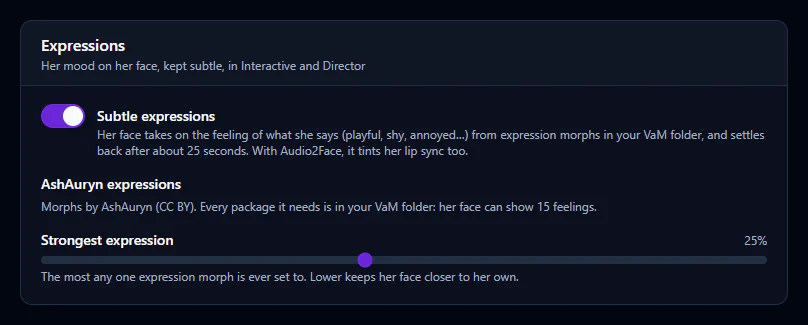
| Setting | What it does |
|---|---|
| Subtle expressions | Turns expressions on or off. Off, her face keeps its own look, apart from lip-sync. |
| AshAuryn expressions | The line under it says whether every package is in your VaM folder, and how many feelings her face can show (15). |
| Strongest expression | The most any one expression morph is ever set to, from 5% to 50% (25% by default). Lower keeps her face closer to her own. |
The feelings she shows
Happy, playful, affectionate, flirty, aroused, shy, smug, surprised, pouty, sad, annoyed, angry, worried, scared and pained, or her own neutral face when nothing stands out. vamAI reads the feeling from what she says, so you don't choose them yourself. When she's close to climax her face shows it strongly, then softens as she recovers.
In Interactive Mode her face changes about a second after she starts a line: vamAI reads the feeling once her reply is written.
With Audio2Face lip-sync
If you use Audio2Face for lip-sync, the same feeling also tints how her mouth and face move as she talks. That part works even before the morph packages are installed.
If her face doesn't change
| What the card says | What to do |
|---|---|
| "Her expressions use morphs from your VaM folder. Choose the folder VaM is installed in…" | Choose your VaM folder under Settings → Look library: the folder that contains AddonPackages. |
| "Her face shows no expressions until your VaM folder has these packages: …" | Download the packages it lists from the VaM Hub, or update the ones it says are too old. Then open the card again. |
| "The vamAI plugin in VaM is too old to show expressions…" | Download the newest plugin and reload it in VaM. See Updating & uninstalling. |
| "VaM's plugin left out … expression morphs…" | A morph wasn't found on her, usually because her look is on the other base body, or it would move her jaw or eyes. Her face shows the rest. |
The card checks again each time you open Settings, so open it after a session to see anything new.
Next steps
- How her face moves when she talks: Facial animation & lip-sync
- Small movements of her body and eyes: Idle motion