
Looks, outfits and places
Catalogue your VaM looks, clothing, poses and places once, and she can change into the one you ask for, or take you both somewhere else.
Ask her to be a redhead tonight, to slip into something red, to put on stockings, or to move you both to a bar, and she can. For that, vamAI needs to know what you have: the appearance presets, clothing, poses and scenes already in your Virt‑A‑Mate folder. You catalogue them once in the Look library, and from then on she can find the one that fits what you asked for.
Changing her look, her outfit or where you are is in Max and in the 7-day free trial. In Pro, your scene changes only when you change it. See Your membership.
What she can do
| Ask her for… | She… | Needs |
|---|---|---|
| A different look ("Can you be a redhead tonight?") | Changes into the appearance preset that fits best. | The Look catalogue |
| An outfit ("Wear something red") | Changes into a clothing preset. | The Outfit catalogue |
| A single piece ("Put on some stockings") | Adds that item to what she's wearing. | Clothing items |
| Another place ("Take me to a bar, let's sit at the counter") | Brings in one of the places you chose and poses you both there. | Environments and the Pose catalogue |
She changes her look, her outfit or the place only when you ask. Taking clothes off and putting them back on is different: she may do that on her own when it fits the moment, unless you switch off Undress on her own (Advanced → Settings → Body and scene → Clothing). That's in Max too.
Each change shows as a line in the conversation while it happens, with a button to undo it: Change her back, Her own clothes or Take us back.
Setting it up
Open Advanced → Settings → Look library.
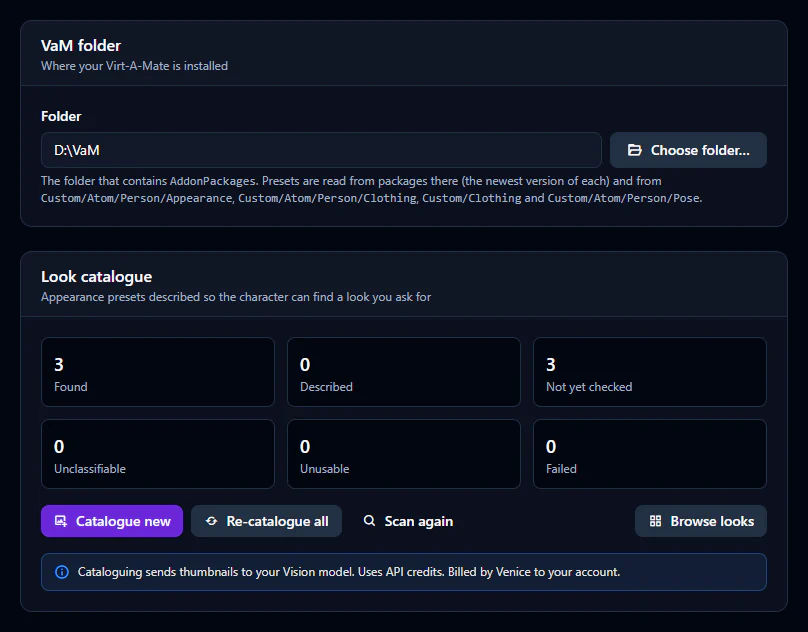
1. Choose your VaM folder
Choose Choose folder… and pick the folder Virt‑A‑Mate is installed in: the one that contains AddonPackages. vamAI reads presets from your packages (the newest version of each) and from VaM's own Custom folders. Cataloguing only reads them; it never changes your presets.
The same folder is used by background music and facial expressions.
2. Catalogue what you want her to find
Each kind has its own card: Look catalogue, Outfit catalogue, Clothing items, Pose catalogue and Environments. On each, choose Catalogue new. vamAI shows each preset's thumbnail to your conversation service's image model (Vision), which describes it in words, and saves the description so she can search it.
Cataloguing sends every thumbnail to your AI service, and it bills your account for each one. A large library can mean thousands of thumbnails. vamAI asks before it starts, with the count, and says who bills you. You can Cancel at any time and keep what's done; Catalogue new later carries on from there.
It needs a conversation service that can read images. Venice can. With an OpenAI-compatible service, turn on Reads images for a model that does.
3. For places: choose them first
Places are different: vamAI never catalogues every scene you own. On the Environments card, choose Choose environments, pick the scenes (rooms with no people in them) you want her to be able to take you to, then Catalogue new. Moving to a place also needs the Pose catalogue, because she's placed there in one of your catalogued poses.
Reading the cards
Each card counts what it found:
| Count | What it means |
|---|---|
| Found | Presets of that kind in your VaM folder. |
| Described | Catalogued and searchable. |
| Not yet checked | New, or changed since the last run. Catalogue new does these. |
| Unclassifiable / Unusable | Left out of every search: the picture was unclear or showed several people, there was no thumbnail, or the file sets nothing. This is on purpose: she never picks a look she can't be sure of. Expect many poses here. |
| Failed | Something went wrong for that preset. Catalogue new tries it again. |
Browse looks (and Browse outfits, Browse items, Browse poses) shows what was found and how each one was described. Scan again looks through the folder again after you've added packages. Re-catalogue all describes everything again, and is billed again.
If she can't find what you asked for
- She says she has nothing like it: check the card has Described entries for that kind. A look you just installed needs Scan again, then Catalogue new.
- "Choose a VaM folder first": choose it on the VaM folder card.
- Cataloguing stops with an error: the card says why; most often the key was refused, the account is out of credit, or the model can't read images. See Error messages explained.
- Nothing changes in VaM: the plugin must be connected and up to date, and the change is a Max feature.
Next steps
- Let her act in your scene too: Setting up your scene
- Other creators' VaM plugins she can use: Plugin integrations