
Background music
Make a few instrumental tracks once, and she puts one on in your VaM scene when the mood calls for it.
vamAI can set the mood with music. You make a small library of instrumental tracks once, on the Music tab, and during a session she chooses one and puts it on in your VaM scene: a slow piano for a quiet evening, something with a beat when the night picks up. She can also stop it. You decide how loud it plays; she only decides what plays.
It works in Interactive Mode and in Director Mode.
Music isn't limited by plan: making and playing tracks works in Pro, Max and the free trial. ElevenLabs bills your account for each track you make.
What you need
- Your ElevenLabs key, to make tracks. The music is made by ElevenLabs Music, and it needs a paid ElevenLabs plan. Tracks you have already made keep playing without a key.
- Your VaM folder, chosen under Advanced → Settings → Look library. vamAI copies each track into it, so VaM can play it. The Music tab says so, with Choose the VaM folder, until it's set.
- The vamAI plugin in your scene, up to date. An older plugin can't play music, and the Music tab tells you to update it.
Making a track
- Open the Music tab and choose Make a track.
- Pick a Style: piano lounge, jazz bar, club, R&B, chill ambient, lo-fi, Spanish guitar, candlelit strings and more. Each fills in the rest of the form for you. Choose Your own to write it yourself.
- Check What the music is: the genre, mood, instruments and tempo. Don't name an artist, a song or a label; ElevenLabs refuses those. If it does, vamAI shows the rewording ElevenLabs suggests, with Use this prompt.
- Choose a Length: 1 min, 2 min or 3 min. A track loops in VaM without a gap, so a short one is enough.
- Give it a Name (what you and she call it) and check What she reads about it. She chooses music by this line alone, so say what it is and when it fits: "Soft, slow late-night piano: intimate and romantic, for talking close."
- Choose Make the track, then confirm.
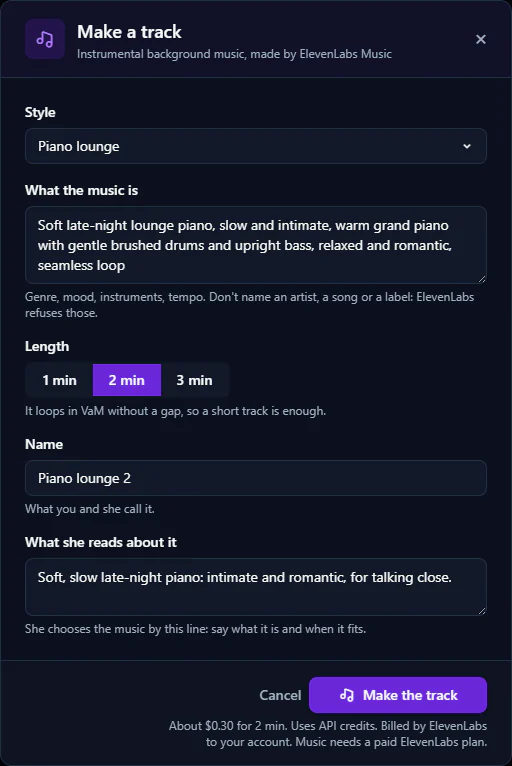
The line under the button says roughly what it costs, for example "About $0.30 for 2 min". ElevenLabs bills your account for it.
Making a track takes a minute or two. You can close the dialog and carry on: the Music tab says what is being made, and the track appears when it's ready. Stop cancels it, and nothing is kept.
Four or five tracks with clearly different moods work better than ten similar ones. She picks by the line she reads, so make each one distinct.
Your tracks
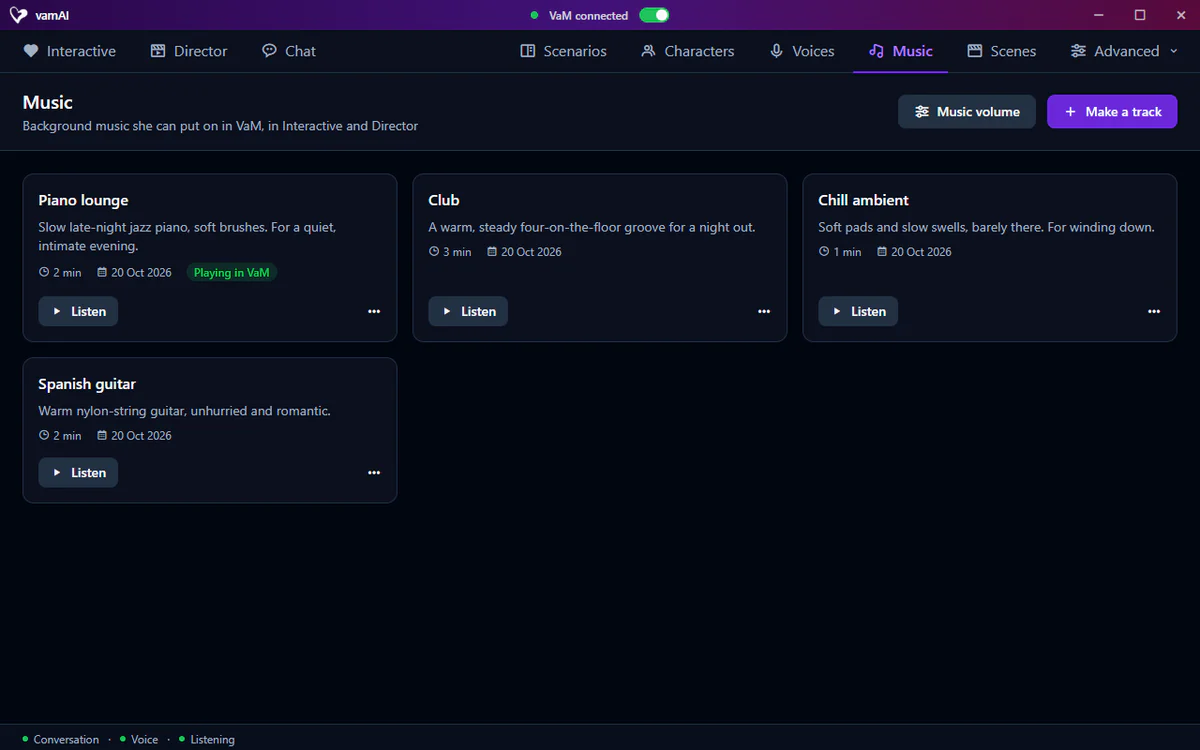
Each track is a card with its name, the line she reads, its length and the day it was made.
- Listen plays it here in the app, so you can check it before she uses it.
- Playing in VaM shows on the track she has put on.
- Didn't play means VaM couldn't find or read the track's file. Hover over it for the reason.
- The ⋯ menu has Edit (its name and the line she reads) and Delete. Deleting a track also removes its copy from your VaM folder; if it's playing, it fades out first.
In a session
You don't need to do anything. When the mood calls for music, she puts a track on, or you can simply ask her: "Put something slow on." She can stop it the same way. The music fades out when the session ends.
Volume
Only you set how loud the music is. Open Advanced → Settings → Sounds, or choose Music volume at the top of the Music tab.
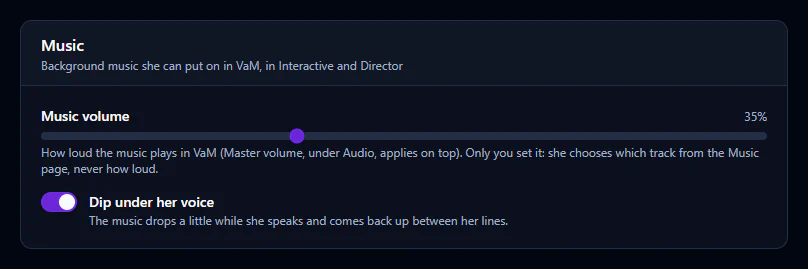
| Setting | What it does |
|---|---|
| Music volume | How loud the music plays in VaM. Master volume (under Audio) applies on top. |
| Dip under her voice | The music drops a little while she speaks and comes back up between her lines. On by default. |
If the music didn't play
| What you see | What to do |
|---|---|
| Make a track is greyed out | Add your ElevenLabs key in Advanced → Providers. See Adding your API keys. |
| "Music needs a paid ElevenLabs plan…" | Upgrade your plan on the ElevenLabs website. Tracks you already have still play. |
| "…doesn't have enough credits left for this track…" | Add credits on the ElevenLabs website, or choose a shorter track. |
| "Music plays from your VaM folder…" | Choose your VaM folder under Settings → Look library: the folder that contains AddonPackages. |
| "The vamAI plugin in VaM is too old to play music…" | Download the newest plugin and reload it in VaM. See Updating & uninstalling. |
| She never puts music on | Check you have at least one track, VaM is connected and Music volume isn't at zero. Then ask her for music in the session. |
| A card says Didn't play | VaM couldn't find or read the file in your VaM folder. Delete the track and make it again. |
Next steps
- Shape the rest of what you hear: Audio & volume and Filler audio.
- Point vamAI at your VaM folder: Looks, outfits and places.