
Plugin integrations
Which VaM plugins from other creators vamAI works with, what each one adds to a session, and how to switch them on or off.
Many of the best things in Virt‑A‑Mate come from other creators' plugins: natural breast physics, a gaze that follows you, bodies that react. vamAI works with several of them. During an Interactive session it adds a supported plugin you already have to the right body, drives it from what's happening in the scene, and puts everything back as it was when the session ends.
Director Mode doesn't use them: a scenario plays without them.
These plugins aren't part of vamAI. An integration only does something if you have that plugin installed in VaM; vamAI never downloads one for you.
Plugin integrations are in Max and in the 7-day free trial. See Your membership.
The plugins vamAI works with
| Plugin (creator) | What it adds in a session |
|---|---|
| Glance (AcidBubbles) | She looks at you when the session starts, after she climaxes, and whenever she chooses to. |
| Naturalis (everlaster) | Natural breast and glute physics for her, for the session and after it. |
| TittyMagic (everlaster) | Natural breast physics for her, when you have it and not Naturalis. |
| Female Chest Physics for Male (Stopper) | Breast physics for a character on a male base body (a futa look), when you have it and not Naturalis. |
| Realistic Erection (RunRudolf) | For a character with a penis: it follows her excitement and peaks when she climaxes. She can also choose to change it herself. |
| Realistic Erection on your body (RunRudolf) | Your own follows the intensity of the scene. |
| Realistic Foreskin (RunRudolf) | For a character with a penis: she can move it when she chooses. |
| Sexy Fluids (Foost) | Her climax shows. Needs Realistic Erection too. |
The plugins that need a penis apply to a male body, or a futa look made with Stopper's AlternativeFuta.
Settings
Open Advanced → Settings → Plugin integrations.
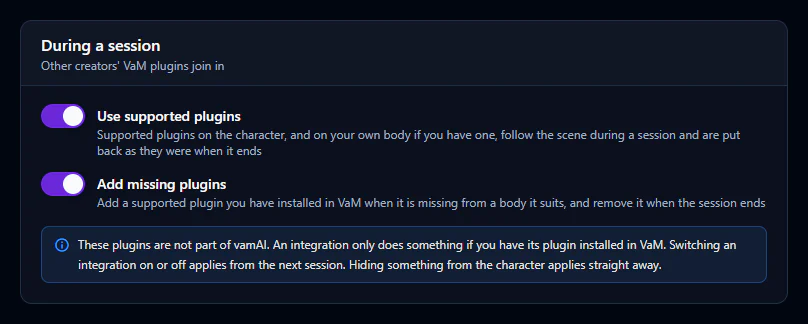
| Setting | What it does |
|---|---|
| Use supported plugins | The main switch. Supported plugins on her, and on your own body if you have one in the scene, follow the session and are put back as they were when it ends. |
| Add missing plugins | Adds a supported plugin you have installed when it's missing from a body it suits, and removes it again when the session ends. Off: only plugins already on the body are used. |
Below them, each plugin has a card, grouped by whose body it's on (On the character and On your body). Each card says what it does, the plugin versions it works with, and a switch to turn that integration off. Switching one on or off applies from your next session.
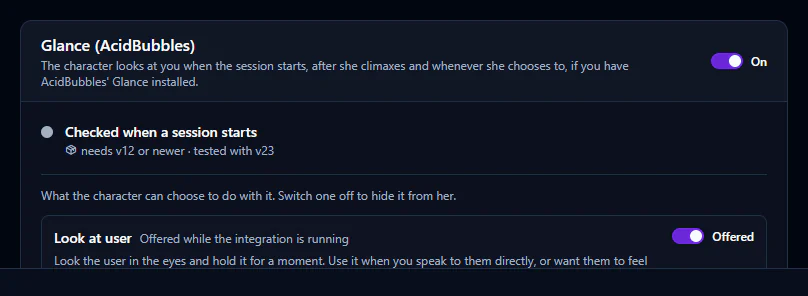
Some plugins give her something she can choose to do, such as Look at user with Glance. Each is listed on the card with its own switch: turn one off to keep it from her. That applies straight away.
Adding support for another plugin
Support for each plugin is a small recipe file. Your recipes, at the bottom of the page, has Open recipes folder: drop a recipe file there and choose Reload recipes. A recipe with the same id as a built-in one replaces it. Files vamAI couldn't read are listed under Recipes that could not be loaded, with the reason.
If a plugin doesn't join in
- Check it's installed in VaM (in your
AddonPackages) and at least the version its card asks for. - Check Use supported plugins and that plugin's own switch are on, then start a new session.
- If two plugins do the same job (Naturalis and TittyMagic, or two gaze plugins), vamAI uses only one and leaves the other alone.
Next steps
- Her looks, outfits and places: Looks, outfits and places
- What she does in the scene on her own: Acting on her own