
Troubleshooting
Common problems, what usually causes them, and how to fix them. Plus how to send us diagnostics if you're still stuck.
Something not working? Find it below. If vamAI showed you a message, Error messages explained lists them all with what to do.
vamAI won't start
- Windows says "Windows protected your PC". Click More info, then Run anyway. See First launch on Windows.
- "vamAI can't write to its folder". The folder is in Program Files or on a read-only drive. Move the whole vamAI folder somewhere you own, such as
C:\vamAI. - Nothing happens when you double-click. vamAI may already be open: check the taskbar. Starting it again only brings the open window forward.
- Your antivirus removed or blocked a vamAI file. Download vamAI again from the downloads page and extract it over your folder, as when updating.
VaM won't connect
The title bar at the top of vamAI shows the connection:
| Title bar | Meaning |
|---|---|
| Waiting for VaM (yellow) | vamAI is ready. The plugin hasn't connected yet. |
| VaM connected (green) | All good. |
| VaM connection off (grey) | The switch beside it is off. Turn it on. |
If it stays on Waiting for VaM, work through these:
- Is the plugin in your scene? Select her Person atom in VaM and check its Plugins tab for VamAIPlugin. See Connecting Virt‑A‑Mate.
- Are plugins allowed? In VaM, User Preferences → Security: turn on Enable Plugins and Allow Plugins Network Access. With network access off, VaM refuses to load the plugin with a message about it "requiring networking", and there's no vamAI panel at all. Turn it on and reload the scene.
- Did VaM ask to allow the plugin? VaM asks "Allow load of plugins from addon VamAI.VamAIPlugin…?" for each new version. If you said no, the plugin doesn't load. See VaM asks to allow the plugin again.
- Is there only one copy of the plugin? A second copy in the same scene stays idle.
- Do the ports match? The plugin's Settings tab and vamAI's Settings → VaM connection (under Advanced) must use the same port (12605 unless you changed it).
- Is another copy of vamAI open? Only one can use the port. vamAI tells you if the port is taken.
- What does the plugin's panel say? Its status bar names the problem, such as Plugin out of date or Another VaM is connected. See The vamAI panel in VaM.
vamAI and VaM must run on the same PC. The plugin only looks for vamAI on its own computer.
She doesn't speak
- Check the voice service. In Advanced → Providers, the voice service should be In use with a key, and Test connection should pass. The bottom status bar shows a dot for it.
- Check the volume. In Advanced → Settings → Audio, make sure Master volume and Her voice aren't at zero. See Audio & volume.
- Check her atom. In the Interactive tab, Her (atom) under Scene setup should be the Person atom she speaks through, in the scene that has the plugin.
- Check her voice. Her profile on the Characters tab needs a voice from your current voice service. Nora's voice is an ElevenLabs voice: with Deepgram or Hume, give her one of theirs. With No voice, she answers in text (the badge reads Text only).
- Check your membership. Her voice is in Pro, Max and the free trial. Without one of them a session doesn't start, and vamAI says why. Settings → Account shows your plan. See Your membership.
Her voice cuts out or is interrupted
Another VaM plugin may be playing sounds on her voice, VAMMoan for example. Keep Mute VAMMoan in sessions turned on in the vamAI plugin's Settings tab. It pauses VAMMoan and the other plugins that use her voice (Life's Breathing, for example) during a session.
She doesn't hear me
- Is your microphone muted? The big microphone button at the bottom of the Interactive tab mutes and unmutes you.
- Is it the right microphone? Choose it under Microphone in the Interactive tab, or in Settings → Audio.
- Is Windows blocking it? In Windows Settings → Privacy & security → Microphone, turn on microphone access for desktop apps.
- Is the listening service ready? In Advanced → Providers, the listening service needs a key (Deepgram) or must be downloaded and running (Whisper).
- Test it. Run the microphone check again from Settings → Help & diagnostics → Run setup again, or see Microphone & speech.
The music didn't play
- Do you have tracks? She can only play tracks you've made on the Music tab.
- Is your VaM folder set? Music plays from it: Settings → Look library.
- Is the plugin up to date? The Music tab says so if it's too old.
- Is it turned up? Check Music volume in Settings → Sounds and Master volume in Settings → Audio.
- A card says "Didn't play": VaM couldn't find or read the file. Delete the track and make it again.
See Background music.
Her face shows no expressions
Open Settings → Body and scene and read the Expressions card: it names what's missing. Usually it's the AshAuryn packages (free on the VaM Hub), your VaM folder, or an old plugin. See Facial expressions.
She moves when I don't want her to
Idle motion keeps her gently moving while she's still. Turn it down or off in Settings → Body and scene → Body and idle motion, or pause it while you pose her. See Idle motion.
A yellow bar says "Add your AI provider keys to get started"
One of the services Interactive Mode needs (conversation, voice or listening) has no key yet. Choose Open Providers, and What you need shows which one. See Adding your API keys.
A key test fails
- Copy the key again from the service's website, with nothing extra at either end.
- Make sure your account at that service has credit.
- Check you're online. A VPN or firewall can block the service.
The message under Test connection says which of these it is. See What the test tells you.
A voice I designed stopped working
Voices belong to the voice service that made them. If you switched voice service in Providers, switch back, or give the character a voice from the new service. See Voice library.
Services on your PC
- Won't start: open it in Advanced → Providers. If its card offers Download, it isn't installed yet. Downloading needs you to be signed in.
- Audio2Face is slow the first time: that's expected. The first start prepares it for your graphics card, which takes a while. Later starts are much quicker.
- Everything feels slow: these services share your graphics card with VaM. Watch the memory meter in the bottom-right corner. If it's nearly full, stop a service you aren't using, or use an online service instead.
Getting help
If you're still stuck, we'd like to see what happened.
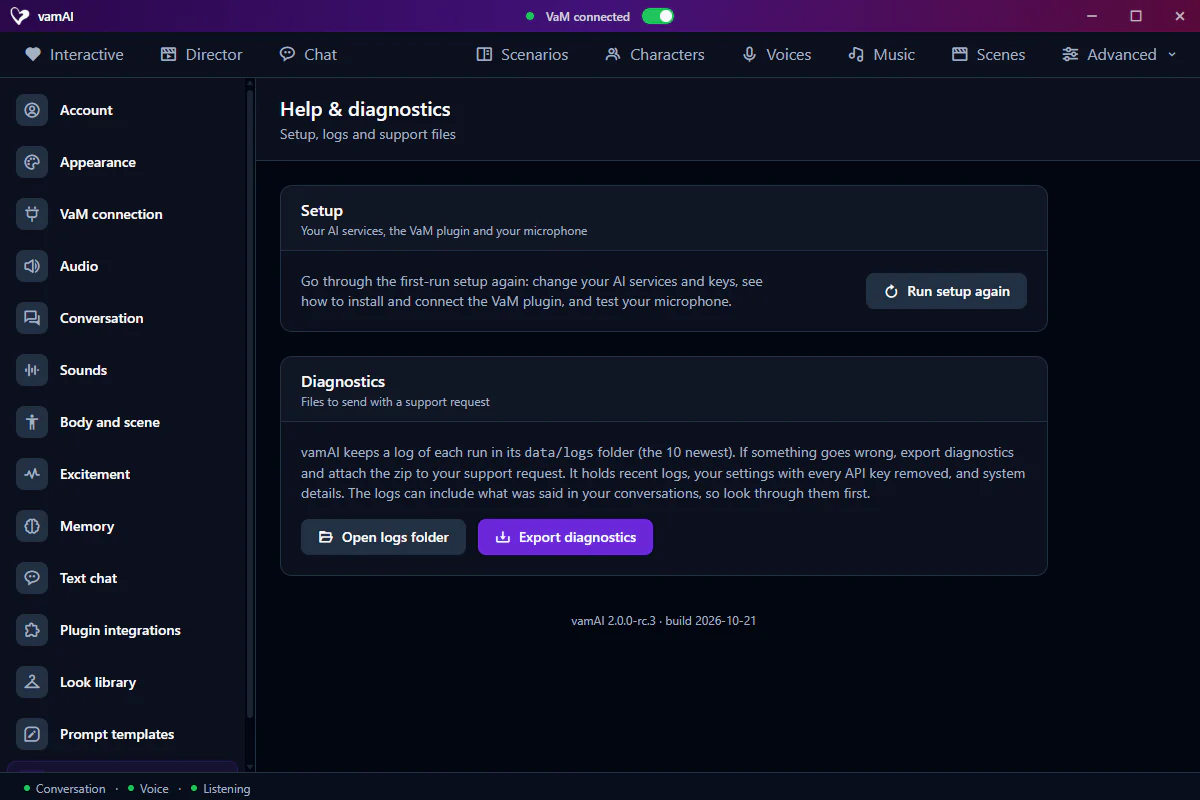
- Open Advanced → Settings → Help & diagnostics.
- Choose Export diagnostics and save the zip.
- Send it to us with a short description of what you were doing.
The zip holds recent logs, your settings with every API key removed, and details about your system. The logs can include what was said in your conversations, so look through them first. Open logs folder shows them.
Reach us in the vamAI community on Discord (opens in new tab), or see the FAQ on the website.
For a VaM-side problem, turn on Enable debugging in the vamAI plugin's Settings tab, reproduce the problem, then include VaM's log too: %USERPROFILE%\AppData\LocalLow\MeshedVR\VaM\output_log.txt.